An AI sales system with Bitrix24
DZAMO reads the conversation, writes the key data and a summary into Bitrix24, creates a task for the manager and can move the lead along the pipeline.
What DZAMO does inside Bitrix24
Moves data out of the conversation
Property type, area, location, the job itself and any other agreed field are filled in without manual copying.
Records what the conversation was about
A short summary appears after the first qualification and again at the moment of handoff.
Works with the current manager
Data, tasks and meetings are attached to whoever already owns the card.
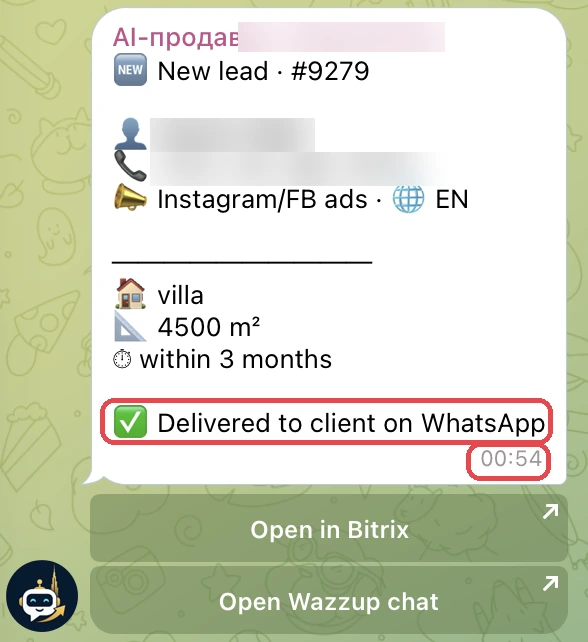
Watches delivery
If the first WhatsApp message is not delivered, I get an alert and look into the cause.
Creates a task for the manager
On handoff the system adds a task for the current owner and attaches the summary of the conversation.
Moves the deal along
The system can convert a lead, change the stage and assign an owner according to your rules.
Evidence from the Dubai deployment
Pipeline and meeting automation
DZAMO can convert a lead into a deal, change stages, assign an owner, offer free slots and create the meeting in the Bitrix24 calendar. We switch on the actions your team actually needs.
The rules are set around your process: when a lead is ready for the next stage, who gets the task, and which calendar to use.
Questions about Bitrix24
What does the system write into Bitrix24?
Whatever your team needs: property type, area, location, budget, timeline and a short summary of the conversation.
Does it convert leads and change stages on its own?
DZAMO can convert leads into deals, change stages and assign an owner. We switch on exactly the actions your pipeline needs.
Can it book meetings in the Bitrix24 calendar?
Yes. The system sees the free slots in Bitrix24, offers times and adds the chosen meeting to the calendar.
What happens to our current lead distribution?
DZAMO works with whoever already owns the lead: it writes the data into their card and creates tasks for them. If the distribution itself needs to change, we set up separate rules.
Let us review your pipeline before we integrate
On the demo we separate the automation that is safe from the actions that are better left to a person.